Everything you need to run microSRE on a single machine or across your fleet.
microSRE ships as a single Python zipapp. No third-party dependencies, no package manager; the one requirement is Python 3.11 or newer.
Root or a regular user? While a regular user is enough, running under root may be a better choice when:
/var/lib/docker/containers directly when they are readable by the current user, which on a standard install means root (the owner works under rootless Docker). Otherwise it falls back to docker logs --since through the docker socket (root or the docker group), which becomes slow and IO-intensive for larger logfiles unless log rotation has been set up. The direct path also keeps track of file offsets, so restarts pick up where they left off.curl -fsSL https://microsre.io/install.sh | bashThe installer downloads the latest release, creates a systemd service if systemd is present and starts it up.
To install manually, download microsre-<version>.pyz from the releases page, rename it to microsre, and make it executable. The rename is not cosmetic: whatever sits on your $PATH is the command you type, and nobody wants to type the versioned file name. Requires Python 3.11 or newer.
microsre --versionIt will display locations of configuration file, logfile and unique machine identifier
Root install - a system-wide service:
sudo systemctl restart microsre
sudo systemctl stop microsre
sudo systemctl start microsre
User install - a user-level service, no sudo:
systemctl --user restart microsre
systemctl --user stop microsre
systemctl --user start microsre
The service is enabled on install and starts automatically - at boot for a root install, at login for a user install. Check status with systemctl status microsre (add --user for a user install).
1. Run microSRE once to create the default configuration file:
microsre --versionAs root the config is written to /etc/microsre/config.toml; as a regular user to ~/.config/microsre/config.toml. --version also prints the log file and machine ID locations.
2. Add a webhook to the config to enable alerts:
webhook_url = "https://hooks.slack.com/services/YOUR/WEBHOOK/URL"3. Verify the configuration:
microsre --verify
# Configuration file valid
4. Watch metrics in the foreground:
microsre --snapshotThe dashboard prints every check - 60 seconds by default, change it with the interval setting - and shows which alerts would fire. Snapshot mode is a dry run - nothing is sent.
5. Start the daemon:
microsre --daemonThe daemon checks on the same interval and sends an alert the moment a threshold is crossed.
microsre [--snapshot [SECONDS]] [--daemon] [--verify] [--version]--snapshot [SECONDS] - run in the foreground, print the metrics dashboard every N seconds (default 60). Alerts are evaluated and displayed, but nothing is sent.--daemon - run the monitoring loop: check every interval seconds (default 60), send alerts, and report to the hosted view when ingest_url is set.--verify - validate the configuration file: TOML syntax, webhook URL, alert rules, log sources, and template placeholders.--version - show the version and the locations of the config file, log file, state file, and machine ID file.Run without arguments, microsre creates the default config file if it is missing and exits.
microSRE reads a single TOML file. The location depends on the user:
/etc/microsre/config.toml~/.config/microsre/config.toml (or $XDG_CONFIG_HOME/microsre/config.toml)If the file does not exist, the built-in default is written there on first run with permissions 0600. There is no --config flag - edit the file in place.
Other files microSRE manages:
/var/log/microsre/microsre.log as root, ~/.local/state/microsre/microsre.log as a regular user. Rotated at 10 MB, two backups kept./var/lib/microsre/state.sqlite or ~/.local/state/microsre/state.sqlite. A small SQLite database holding the read offsets of every log source and the last-seen times of heartbeat patterns, so a restart picks up where it left off. Offsets older than ten minutes are treated as stale on startup: sources tail to the end instead of catching up./var/lib/microsre/machine-id or ~/.local/state/microsre/machine-id. A random UUID that identifies this machine to the hosted view.# Report to the microsre.io hosted view (optional)
# ingest_url = "https://eu.microsre.io/ingest?token=<your token>"
# Expose metrics for Prometheus scraping (optional)
# prometheus_listen = "127.0.0.1:9100"
# Seconds between checks in daemon mode
interval = 60
# Where alerts go (optional). Slack, Discord and Telegram webhook URLs are
# auto-detected from the URL; any other URL gets a plain JSON POST with a
# "text" field. No webhook_url - no chat alerts (they still go to the system log).
# webhook_url = "https://hooks.slack.com/services/..."
# or: webhook_url = "https://discord.com/api/webhooks/..."
# or: webhook_url = "https://api.telegram.org/bot<token>/sendMessage"
# username = "microsrebot" # optional display name, Slack and Discord
# chat_id = "-1001234567890" # Telegram only
[alerts]
# metric name fire when value >= max for `duration` seconds
"mem.utilization_pct" = { max = 90, duration = 0, recovery_margin = 0.95, template = "metric" }
"cpu.utilization_pct" = { max = 80, duration = 0, recovery_margin = 0.95, template = "metric" }
"disk.space_usage_pct" = { max = 90, duration = 0, recovery_margin = 0.95, template = "metric" }
"oom.count" = { max = 1, duration = 0, template = "oom" }
"logs.nginx.error_count" = { max = 10, duration = 120, recovery_margin = 0.95, template = "logs" }
[[logs]]
name = "nginx"
path = "/var/log/nginx/error.log"
error_pattern = "\\[error\\]|\\[crit\\]|\\[alert\\]|\\[emerg\\]"
[[docker-logs]]
# containers = ["django-app", "celery-worker"] # default: all containers
error_pattern = ".(ERROR|CRITICAL|FATAL)."
[[templates]]
name = "metric"
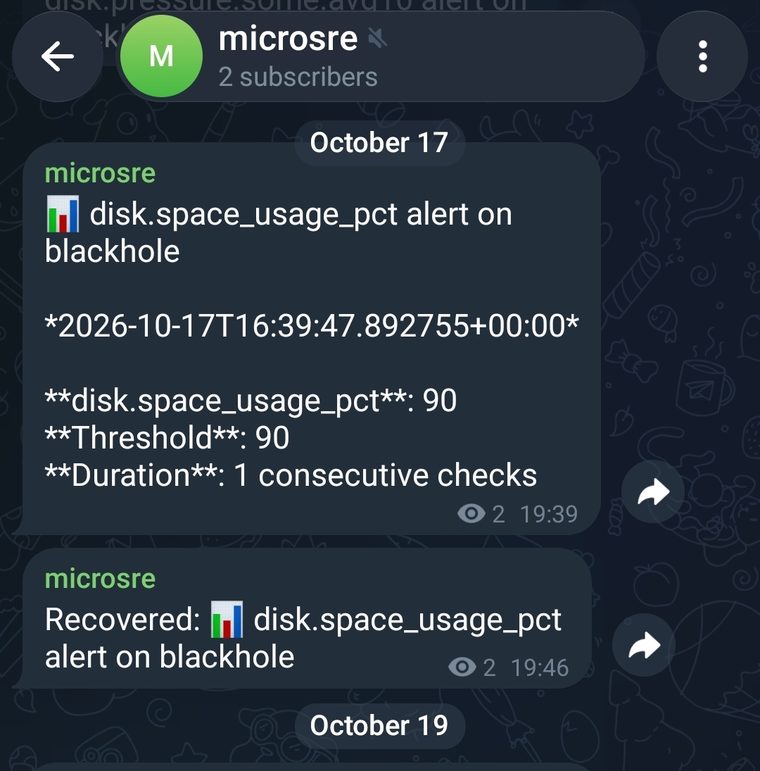
title = "📊 {metric.name} alert on {hostname}"
body = """**{metric.name}**: {metric.value}
**Threshold**: {metric.min} {metric.max}
**Duration**: {metric.duration} seconds
Investigate: `microsre --snapshot` (live view), `vmstat 1` (runnable/blocked, swap), `cat /proc/pressure/*`"""webhook_url - single destination for alerts, sent directly from your machine; the hosted service is not involved. Slack (hooks.slack.com), Discord (discord.com/api/webhooks), and Telegram (api.telegram.org) are auto-detected; any other URL receives a plain JSON POST with a text field, so your own receiver works too. Omit to run without chat alerts - alert lines still land in the system log.username - bot display name for Slack and Discord. Defaults to microsre.chat_id - Telegram only, required for Telegram webhooks.ingest_url - report metrics and alerts to the microsre.io hosted view. See Fleet / SaaS.prometheus_listen - optional "host:port" to expose all metrics in Prometheus text format at /metrics. Off by default; daemon mode only.interval - seconds between checks in daemon mode. Default 60; values below 5 are rejected. With a shorter interval, alert duration values stay in seconds and need no re-tuning.[alerts]Each key is a metric name, each value is a rule:
max - fire when the value is greater than or equal to this.min - fire when the value is less than or equal to this. Use max, min, or both.duration - seconds the threshold must hold before the alert fires. Default 0 - the alert fires as soon as the threshold is crossed. Because the value is seconds rather than checks, a rule means the same thing at any interval: with the default 60s interval, duration = 60 fires on the second crossed check in a row.recovery_margin - fraction of the threshold the value must return inside before a "Recovered" message is sent. E.g. 0.95 sends recovery once the value drops below 95% of max. Default 0 - the alert state resets silently, with no recovery message.template - name of a [[templates]] entry used to render the message. Required.Every metric, exactly where it comes from, and how it is measured:
| Metric | Source file | Semantics |
|---|---|---|
| Memory | ||
mem.utilization_pct | /proc/meminfo | instantaneous |
| MemTotal, MemAvailable (used = total - available) | ||
mem.swap_utilization_pct | /proc/meminfo | instantaneous |
| SwapTotal, SwapFree | ||
vm.swap_in_bytes_per_sec, vm.swap_out_bytes_per_sec, vm.major_faults_per_sec | /proc/vmstat | integral (counter diff) |
| pswpin, pswpout, pgmajfault diffs over the interval, swap rates in bytes; the interval view of burst.vm.max_* | ||
mem.pressure.{some,full}.avg{10,60} (+ .previous) | /proc/pressure/memory | instantaneous (kernel-windowed) |
| some / full line, avg10 / avg60 | ||
| CPU | ||
cpu.utilization_pct, cpu.iowait_pct, cpu.steal_pct | /proc/stat | integral |
| cpu line - user, nice, system, idle, iowait, irq, softirq, steal ticks, diffed over the interval | ||
cpu.max_utilization_pct, cpu.max_utilization_core, cpu.<core>.utilization_pct | /proc/stat | integral |
| cpuN per-core lines | ||
cpu.loadavg.1min (+ .previous) | /proc/loadavg | instantaneous (kernel-decayed) |
| 1 min field | ||
cpu.ctxt_per_sec | /proc/stat | integral (counter diff) |
| context switches per second, averaged over the interval; the interval view of burst.cpu.max_ctxt_per_sec | ||
cpu.procs_blocked | /proc/stat | instantaneous |
| tasks in uninterruptible (D) sleep at tick time; the interval view of burst.cpu.max_procs_blocked | ||
cpu.pressure.{some,full}.avg{10,60} (+ .previous) | /proc/pressure/cpu | instantaneous (kernel-windowed) |
| some / full line, avg10 / avg60 | ||
| Disk | ||
disk.space_usage_pct | /proc/self/mountinfo | instantaneous |
| per-mount statvfs bytes used / total; each device counted once | ||
disk.max.utilization_pct, disk.max.await_ms, disk.max.queue_depth, disk.max.device | /proc/diskstats | integral; instantaneous (queue depth) |
| per device: time_in_progress diff; await = (time_reading + time_writing) / (reads + writes); queue depth = in_progress gauge; stacked dm/md deduplicated to the backing disk | ||
disk.total.{read,write}_bytes_per_sec | /proc/diskstats | integral |
| sectors_read / sectors_written x 512-byte sectors (standard kernel units) | ||
disk.total.{read,write}_iops | /proc/diskstats | counter |
| reads / writes completed | ||
disk.pressure.{some,full}.avg{10,60} (+ .previous) | /proc/pressure/io | instantaneous (kernel-windowed) |
| some / full line, avg10 / avg60 | ||
disk.<device>.* | /proc/diskstats | integral; instantaneous (queue depth) |
| per-device counters, diffs over the check interval | ||
| Network | ||
net.total.{rx,tx}_bytes_per_sec | /proc/net/dev | integral |
| sum of per-interface rx_bytes / tx_bytes | ||
net.total.errs_per_sec, net.total.drop_per_sec | /proc/net/dev | counter |
| rx_errs + tx_errs, rx_drop + tx_drop | ||
net.tcp.retrans_per_sec, net.tcp.retrans_ratio_pct | /proc/net/snmp | counter |
| Tcp: - RetransSegs, OutSegs | ||
net.tcp.listen_drops, net.tcp.listen_overflows | /proc/net/netstat | counter |
| TcpExt: - ListenDrops, ListenOverflows | ||
net.max.utilization_pct, net.max.utilization_iface | /proc/net/dev + /sys/class/net/<iface>/speed | integral |
| max of rx/tx bytes x8 as % of link speed (unknown for virtual or link-down interfaces) | ||
net.max.{rx,tx}_bytes_per_sec, net.max.{rx,tx}_iface | /proc/net/dev | integral |
| busiest interface by bytes | ||
net.<iface>.* | /proc/net/dev | integral; counter (errs, drop) |
| per-interface counters, diffs over the check interval | ||
| Burst | ||
burst.cpu.max_utilization_pct, burst.cpu.max_utilization_core, burst.cpu.max_steal_pct, burst.cpu.max_iowait_pct, burst.cpu.max_ctxt_per_sec, burst.cpu.max_procs_running, burst.cpu.max_procs_blocked | burst sampler: /proc/stat every second | max over 1s sub-intervals |
| worst second in the window: hottest core, steal, iowait, context switches, runnable and blocked task counts; procs_running excludes the sampler itself | ||
burst.disk.max_utilization_pct, burst.disk.max_utilization_device | burst sampler: /proc/diskstats every second | max over 1s sub-intervals |
| the busiest device-second in the window | ||
burst.net.tcp.max_retrans_per_sec, burst.net.tcp.max_listen_drops_per_sec, burst.net.tcp.max_listen_overflows_per_sec | burst sampler: /proc/net/snmp, /proc/net/netstat every second | max over 1s sub-intervals |
| worst second in the window for retransmits and listen queue drops | ||
burst.vm.max_swap_in_bytes_per_sec, burst.vm.max_swap_out_bytes_per_sec, burst.vm.max_major_faults_per_sec | burst sampler: /proc/vmstat every second | max over 1s sub-intervals |
| worst second in the window for swap in/out and major faults | ||
burst.disk.<device>.*, burst.net.<iface>.* | burst sampler: /proc/diskstats, /proc/net/dev every second | max over 1s sub-intervals |
| per-device and per-interface worst-second values | ||
burst.samples, burst.dropped | burst sampler | counter |
| how many sub-samples the window maxima rest on; dropped counts samples overwritten when the main loop fell behind | ||
| OOM kills | ||
oom.count, oom.victims | kernel log (auto-detected, no config) | counter |
| OOM killer events | ||
| Log sources | ||
logs.<source>.*, docker-logs.<source>.* (per configured log source) | the configured log file or container JSON logs | counter; gauge (heartbeat age) |
| line_count / error_count / error_pct / errors - lines matching line_pattern / error_pattern; with heartbeat_pattern configured: heartbeat_last_seen (unix time of last match, 0 = never), heartbeat_age_seconds (seconds since it, huge when never), heartbeat_status (pre-worded 'not seen yet' / 'not seen for N seconds' for templates) | ||
| Collection | ||
collect.procfs_seconds, collect.proc_pid_seconds | self-measured, time.monotonic_ns() around the collectors | measured duration |
| procfs collection time per tick; proc_pid is the /proc/<pid> scan portion of it | ||
collect.logs_seconds, collect.docker_logs_seconds, collect.oom_seconds | self-measured, time.monotonic_ns() around the collectors | measured duration |
| log scanning time per tick | ||
self.cpu_seconds, self.cpu_pct, self.rss_bytes, self.read_bytes_per_sec, self.ctx_switches_per_sec | self-measured, /proc/self/stat, /proc/self/io, /proc/self/status | mixed: counter, integral, instantaneous |
| microsre itself: total CPU seconds, CPU pct last interval, RSS, storage reads caused, wakeups per second | ||
hostname, timestamp, and uptime (from /proc/uptime) are also available - mostly useful in templates.
[[templates]]Alert messages are rendered with Python format-string placeholders:
{mem.utilization_pct}. Pressure and load average metrics also have .previous variants with the previous check's value.{metric.name}, {metric.value}, {metric.min}, {metric.max}, {metric.duration} - the rule that fired.{scope.*} - fields of the metric family the alert belongs to. For an alert on logs.nginx.error_count: {scope.name}, {scope.error_count}, {scope.error_pct}, {scope.errors} (recent matching lines).{hostname}, {timestamp}, {uptime}.Placeholders that don't match any known field are reported by microsre --verify.
Optional. Set prometheus_listen and the daemon serves the metrics listed above in Prometheus text format at /metrics - point a scrape target at it. Without this setting nothing listens. The endpoint has no authentication: localhost is the safe default, and exposing it to a network should be a deliberate choice (firewall or reverse proxy).
Exposed names carry a microsre_ prefix with dots turned into underscores - mem.utilization_pct becomes microsre_mem_utilization_pct. Per-core, per-device, and per-interface families become labels instead: microsre_cpu_utilization_per_core{core="cpu0"}, microsre_disk_await_ms{device="sda"}, microsre_net_rx_bytes_per_sec{iface="eth0"}. Everything is a gauge. Non-numeric fields (hostnames, error text, the max-util summaries' device names) are not exported.
microSRE reads /proc directly. No shelling out to ps, top, or iostat.
Source: /proc/stat
CPU usage is calculated by diffing user, system, and idle ticks between intervals. The result is a percentage of total capacity.
Source: /proc/meminfo
Used memory is MemTotal - MemAvailable. This matches what the OOM killer sees, not what free reports.
Source: /proc/diskstats
Reads and writes are counted per block device, along with utilization, await, and queue depth. When device-mapper or md devices stack on top of real disks (LVM, dm-crypt, RAID), only the backing disk is counted so totals are not double-counted. Space usage comes from statvfs on each physical mount.
Source: /proc/net/dev
Bytes and packets in/out are tracked per interface. Dropped and error counters are included in alerts.
Source: /proc/pressure/cpu, /proc/pressure/memory, /proc/pressure/io
Pressure stall information (PSI) is available on kernels 4.20+. It measures how much time tasks spend waiting for resources. This is the same signal systemd uses for OOM avoidance.
microSRE tails log files and counts lines. Each [[logs]] entry takes a name and an absolute path:
[[logs]]
name = "nginx"
path = "/var/log/nginx/error.log"
line_pattern = ".*"                       # default: every line counts
error_pattern = ".*"                      # default: every line is an error
On every check, each source reports logs.<name>.line_count, .error_count, .error_pct, and .errors (the recent matching lines). Alert on any of them - e.g. max = 10 on logs.nginx.error_count fires when more than 10 error lines appear in a single check.
re.search - no full-match anchoring unless you add ^ and $.[[logs]]
name = "nginx"
path = "/var/log/nginx/error.log"
error_pattern = "\\[error\\]|\\[crit\\]|\\[alert\\]|\\[emerg\\]""logs.nginx.error_count" = { max = 10, duration = 120, template = "logs" }This fires when at least 10 error-level lines appear per check and the total stays above the threshold for 120 seconds, and uses the logs template which includes the recent error lines.
Some jobs only need to prove they ran. Set heartbeat_pattern to the line a healthy source logs regularly, and microSRE reports logs.<name>.heartbeat_last_seen (unix time of the last match, 0 = never), logs.<name>.heartbeat_age_seconds (seconds since it), and logs.<name>.heartbeat_status (a pre-worded "not seen yet" / "not seen for N seconds" for templates):
[[logs]]
name = "nightly-batch"
path = "/var/log/nightly-batch.log"
heartbeat_pattern = "batch (done|finished)"
"logs.nightly-batch.heartbeat_age_seconds" = { max = 87000, duration = 0, template = "heartbeat" }This fires when nothing matched the pattern for 24 hours plus 20 minutes of drift. Until the first match the age is huge, so a job that never runs at all alerts right away. The last-seen time is persisted in state.sqlite and survives restarts; an edited heartbeat_pattern starts over, so a typo alerts within one interval instead of up to a day later. A beat that arrived during a downtime longer than ten minutes is missed and may alert once - it self-heals at the next beat. It works for [[docker-logs]] sources as well.
[[docker-logs]]
# containers = ["django-app", "celery-worker"]   # default: all containers
line_pattern = "^\\d{4}-\\d{2}-\\d{2}"   # e.g. lines starting with a timestamp
error_pattern = ".(ERROR|CRITICAL|FATAL)."
When /var/lib/docker/containers is readable by the current user (root on a standard install, or the owner under rootless Docker), microSRE reads the container JSON logs directly and keeps file offsets - cheap. Otherwise it falls back to docker logs --since on every check, which needs the docker socket (root or the docker group) and becomes slow and IO-intensive unless log rotation is set up. Docker Compose replica suffixes (-1, _1) are stripped, so containers lists service names. Metrics are reported per container as docker-logs.<name>.*. A stopped or removed container keeps reporting a tick with zero lines, so heartbeat ages keep growing and the dead man's switch still fires. In this direct-file mode, read positions are kept in state.sqlite: a restart within ten minutes of downtime picks up where it left off (heartbeat sources catch up on what they missed; other sources resume at the end of the log).
Add as many [[logs]] and [[docker-logs]] sections as you need. Each is independent.
microSRE must have read access to the log files. If running as a non-root user, add that user to the adm or systemd-journal group, or adjust file ACLs.
Alerts go straight from your machine to a single webhook_url - Slack, Discord, Telegram, or any endpoint that accepts a JSON POST. The hosted service is not involved in delivery. Omit the key to run without chat alerts; alert lines still land in the system log.
# Slack
webhook_url = "https://hooks.slack.com/services/T00000000/B00000000/XXXXXXXX"
username = "microsrebot"      # optional

# Discord
webhook_url = "https://discord.com/api/webhooks/..."

# Telegram - chat_id required
webhook_url = "https://api.telegram.org/bot123456:ABC-DEF.../sendMessage"
chat_id = "-1001234567890"
For Telegram private chats, the chat ID is your user ID. For groups, add the bot to the group and use the group ID (usually a negative number). If Telegram returns HTTP 400, the bot is usually missing channel admin rights.
max (or min) and stays crossed for the rule's duration (in seconds).recovery_margin set, one "Recovered" message goes out when the value returns within the margin.[[templates]] - see Configuration for the placeholder reference. Telegram messages get MarkdownV2 escaping automatically.
Choosing between monitoring tools? There is an honest map of the options - Netdata, Prometheus, healthchecks.io, Uptime Kuma, Monit - including when microSRE is the wrong tool.
This is your command and control center with health checks from all your machines in one place
1. Sign up at microsre.io to get an ingest URL with a token.
2. Add one line to the top of your config:
ingest_url = "https://eu.microsre.io/ingest?token=<your token>"3. Restart the daemon. The machine appears in your fleet view within one check, reports a heartbeat every check, and sends "up" / "down" events on start and shutdown. If a machine stops checking in, the hosted view alerts - a dead man's switch, not a missing data point.
microsre --verify to validate the config, and microsre --snapshot to watch which alerts fire in the foreground (snapshot is a dry run - nothing is sent).curl -I https://hooks.slack.cominterval in the config - or run a slower foreground loop: microsre --snapshot 300./proc. In containers, ensure the procfs is mounted read-only, not masked.grep -E 'your-pattern' /var/log/your.log to confirm it matches.journalctl -u microsre -n 50 --no-pagerCommon causes: invalid TOML syntax, a bad regex in a log pattern, a missing Telegram chat_id, or missing read permissions on log files. The config file itself is created automatically on first run - check the path printed by microsre --version.
Still stuck? Open an issue on GitHub or email hello@microsre.io.